Posh 如何借助 Expo 从每周手动发布移动端版本走向持续交付
Posh 重建移动端 CI/CD 流水线,消除手动发布瓶颈,应用登顶 App Store 娱乐类排行榜。
中文
复制

本文是 David Davidov 的客座文章——他是 Posh 的创始工程师。Posh 是一个面向线下体验的社交市场,帮助组织者通过活动创建、扩展社区并实现变现。
…
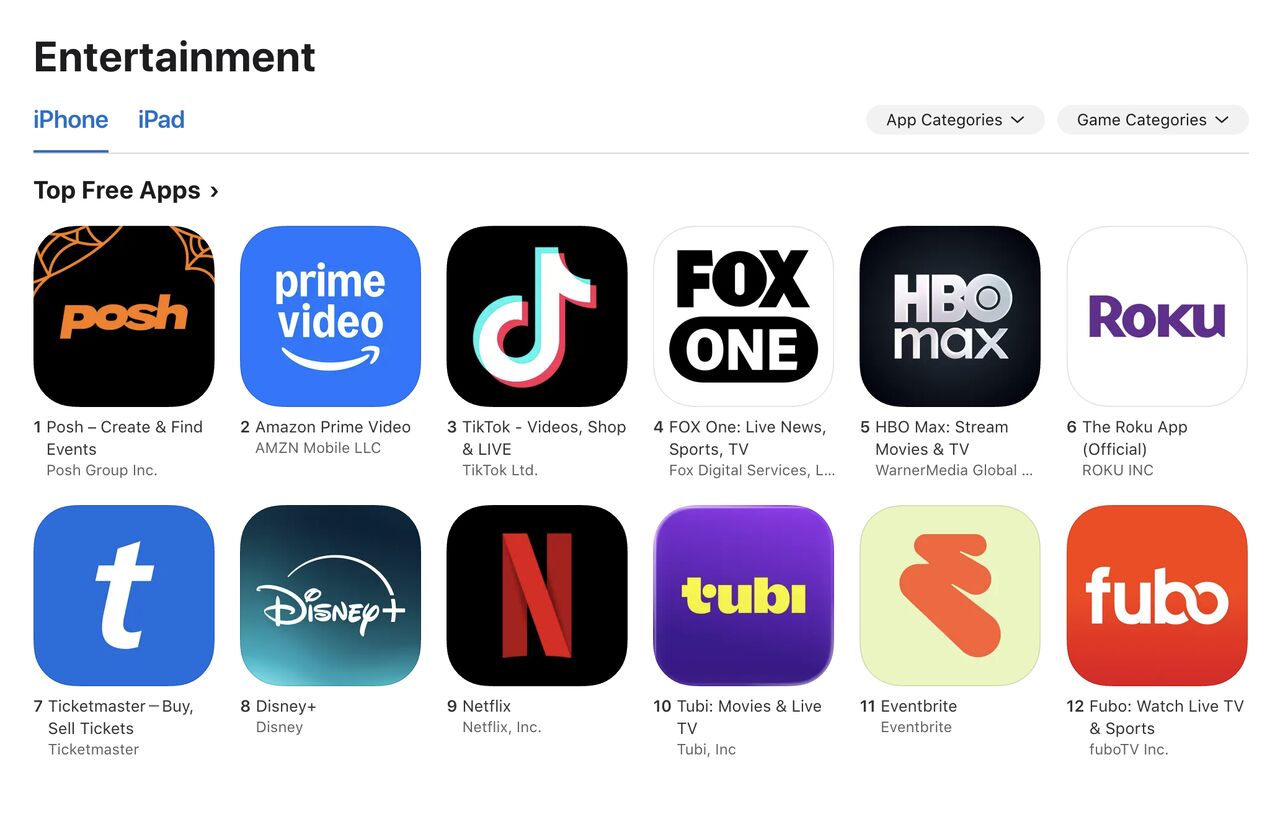
在经历了漫长的应用审核周期和时效性很强的手动发布之后,我们 Posh 团队投入精力重建了移动端 CI/CD 流水线,尽可能消除手动操作。背景是这样:我们的应用在 iOS 和 Android 上服务数百万用户,因此安全、可靠、按时地把版本交付到应用商店,一直是我们最看重的事。这笔投入得到了回报,发布速度的提升也支撑了我们的增长,让应用一度登上 App Store 娱乐类排行榜第一。
发现痛点
两年多前,我开始开发我们的移动应用,从那时起就一直很讨厌通过应用商店手动发布的那套流程。团队早就知道 Expo Updates,但在 fingerprinting 和 EAS Workflows 的预置任务出现之前,自动化 OTA 更新的过程总感觉有点别扭,出错的空间太大。过去两年里我们遇到的痛点有:
-
无法知道 Linear 上的某个任务是在哪个应用版本发布的。
-
不得不每周轮换一个 Release Train 负责人,由他负责发布那一周的改动 ← 我们最大的瓶颈
-
把 E2E 测试自动集成到发布流程中
-
不得不靠不稳定的 GitHub Actions 来触发构建和提交,维护成本很高
-
难以判断某个工程师的 PR 是否引入了新的原生改动
这些痛点让移动端开发变成了一件苦差事,而不是一个富有创造性、节奏飞快的体验。
在重新研究了 Expo 在 fingerprinting、workflows 和 OTA 更新方面的进展之后,我决定从头重新设计我们的发布系统,尽可能自动化整个流程,同时在最关键的地方保留手动审批环节。这套自动化让我们从每周手动发布,变成了几乎每月一次商店发布、每周多次 OTA 更新!
我们想解决的问题
-
更简单地安装和测试 PR 中引入的新改动,同时能判断这个 PR 是否引入了新的原生改动
-
一套不会过度触发 EAS 构建的系统,只在我们准备好开始测试时才触发
-
优雅地引入 OTA 更新,并让它们有机会在 staging 环境中被测试,合并到 master 的改动不应该自动部署到生产环境!
-
减少创建新版本分支的需求,只在原生改动进入 master 时才引入新分支
-
自动化处理通知团队的麻烦事:新版本何时发布到生产环境,以及这些版本包含哪些改动
下面讲讲我们是怎么做到少花时间在发版上的,你们可以直接抄作业。
前置条件
推荐先看 Beto 的这个视频,讲的是如何拆分应用环境,配置具体的更新通道/应用环境时会用到。看完那篇教程,你应该就能在同一台设备上同时装 development、preview/staging 和 production 三个构建了。这样测试起来也方便很多,几个构建之间来回切就行。
在项目里把 Expo Updates 和 Expo Fingerprints 配好。
自动化之一:配置 PR 预览
这一步对 CI/CD 流程来说不是必须的,但能帮团队更快地 review 改动,尤其是你们喜欢用 agent 干活的话。
看完这篇文章之后,我受到启发,做了个 EAS workflow:在 PR 下评论一个二维码,扫码就能把这次新改动装到 development 应用上。代码细节就不展开了,只说我在这个 workflow 上改的几处:
-
找不到 fingerprint 就不构建(没法 OTA 到 development)。我觉得硬构建有点浪费额度。以后要是想让 agent 自动更新依赖包,可能会改掉这个逻辑。
-
引入原生代码的 PR 会打上
needs new build标签。纯粹是为了在 GitHub 上筛选 PR——往下看你就知道,我挺喜欢用标签的。 -
Expo 示例里那条评论我们改得定制化了一些:加了操作说明、当前 fingerprint 下最近几次构建的链接、排查步骤,二维码也放大了,想不看见都难 😆
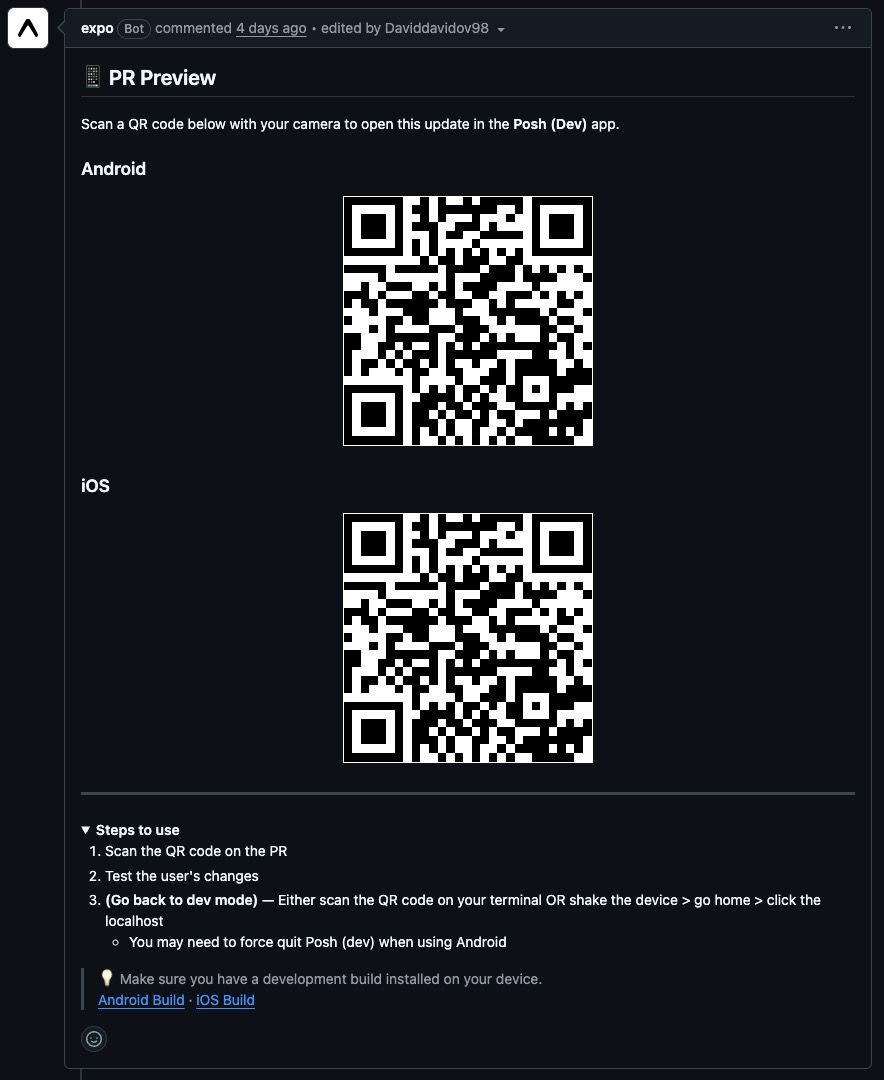
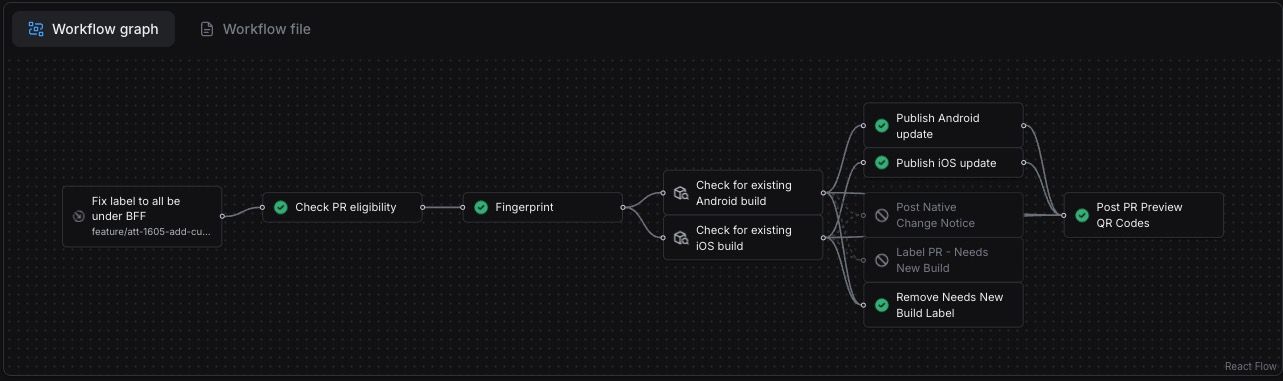
现在,当我让 Devin 或 Claude 修改应用某个区域的代码时,我可以立刻闪一下,直观看到具体改了什么。现在随时随地都能 review 和发布 🏃♂️✨
自动化 2:OTA 分支
假设我把几个 PR 合并进了 master。我并不希望这些 PR 未经任何测试就直接部署到生产环境。创建 OTA 分支还能让我们把多个改动攒在一起做一次 OTA,而不是每个 PR 都触发一次 OTA 更新。
OTA 分支需要两个 workflow:
一个 master/main workflow。用途包括:
-
在当前应用版本下开一个 OTA 分支,可以带一个可选的
OTA branch标签,例如8.0.0 OTA #1- 标签让筛选 PR 更方便 ✨
-
如果 OTA 分支已经存在,就把它 rebase 到 master 上
-
自动把新引入的 PR 标题和 issue 编号写进该 PR 内的 changelog
-
OTA 分支合并进 master 时,触发一次到生产环境的 EAS Update
-
master/main workflow 还会继续扩展;最后一节会概述 master workflow 最终的样子
另一个 workflow 在每次 push 到 OTA 分支时运行,内容包括:
- 把 OTA 发布到你的 preview 环境
大致长这样:
name: OTA Preview

on:
  push:
    branches: ['ota_update_*']

jobs:
  fingerprint:
    name: Fingerprint
    type: fingerprint
    environment: preview

  publish_preview_android:
    name: Publish Android preview OTA
    needs: [fingerprint]
    type: update
    environment: preview
    params:
      platform: android
      branch: preview

  publish_preview_ios:
    name: Publish iOS preview OTA
    needs: [fingerprint]
    type: update
    environment: preview
    params:
      platform: ios
      branch: preview
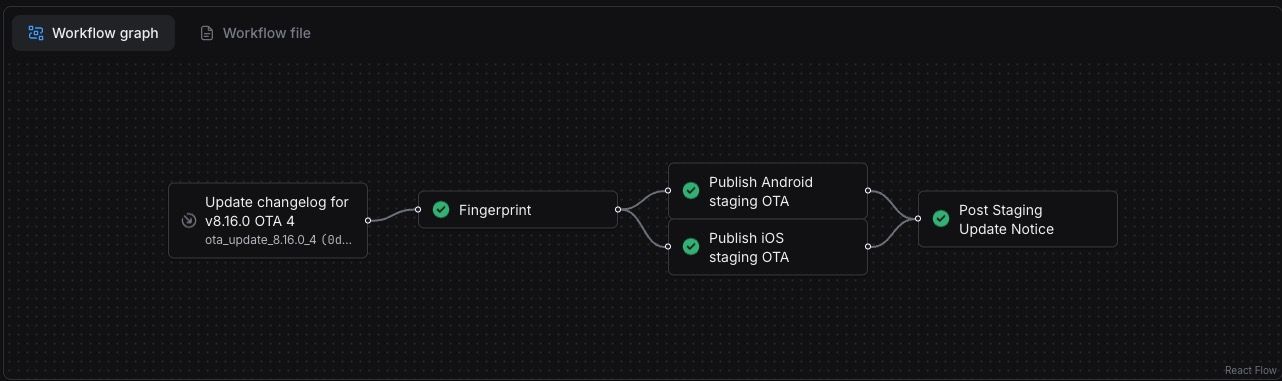
OTA 分支里的 diff 应该只包含 changelog 更新,就像这样:
## v8.15.1 OTA 1 (2026-04-13)

- Sample JS Changes white again #166
- Sample JS Changes green again #165
- Sample JS Changes #163
- Sample JS Changes #161
- Sample JS Changes #160
- Sample JS Changes #158

## v8.15.1 (older version)
changelog 在最后一个自动化流程里怎么用,我们后面再谈。
自动化 3:版本分支
假设我合并了一个引入原生变更的 PR。我希望工作流关掉或作废所有进行中的 OTA 分支,并新建一个版本分支来替代它。这个分支会一直保留到我们把它部署到生产环境为止。工程团队据此判断是否需要通过应用商店发新版本,它是唯一依据。
和 OTA 分支一样,版本分支也包含两个工作流:
扩展 master 工作流,让它处理新的原生变更。
-
如果存在 OTA 分支,关掉它,并新建一个带
Version Branch标签的版本分支- 自动递增移动应用的
package.json版本号
- 自动递增移动应用的
-
如果版本分支已经存在,就把它 rebase 到 master 上,并像 OTA 分支那样更新 changelog
一个在手动给它打上 build & submit bundles 标签时触发的工作流
-
这样只有团队准备好出包时才会提交到应用商店
-
它使用 Expo 预打包好的工作流命令构建并提交到 staging track
-
两个商店都检测到新 bundle 后,我们自动邀请端到端测试人员参与构建
-
提交完成后,通过 Slack 通知端到端测试人员开始测试
大致是这样:
name: Version Branch Builds

on:
  pull_request:
    types: [labeled]

concurrency:
  cancel_in_progress: true
  group: ${{ workflow.filename }}-${{ github.ref }}

jobs:
  build_production_android:
    name: Build Production Android
    if: ${{ github.event.label.name == 'build and submit' }}
    type: build
    environment: production
    params:
      platform: android
      profile: production

  build_production_ios:
    name: Build Production iOS
    if: ${{ github.event.label.name == 'build and submit' }}
    type: build
    environment: production
    params:
      platform: ios
      profile: production

  build_preview_android:
    name: Build Preview Android
    if: ${{ github.event.label.name == 'build and submit' }}
    type: build
    environment: preview
    params:
      platform: android
      profile: preview

  build_preview_ios:
    name: Build Preview iOS
    if: ${{ github.event.label.name == 'build and submit' }}
    type: build
    environment: preview
    params:
      platform: ios
      profile: preview

  build_development_android:
    name: Build Development Android
    if: ${{ github.event.label.name == 'build and submit' }}
    type: build
    environment: development
    params:
      platform: android
      profile: development

  build_development_ios:
    name: Build Development iOS
    if: ${{ github.event.label.name == 'build and submit' }}
    type: build
    environment: development
    params:
      platform: ios
      profile: development

  submit_production_android:
    name: Submit Production Android
    needs: [build_production_android]
    type: submit
    environment: production
    params:
      build_id: ${{ needs.build_production_android.outputs.build_id }}
      profile: production

  submit_production_ios:
    name: Submit Production iOS
    needs: [build_production_ios]
    type: submit
    environment: production
    params:
      build_id: ${{ needs.build_production_ios.outputs.build_id }}
      profile: production

  submit_preview_android:
    name: Submit Preview Android
    needs: [build_preview_android]
    type: submit
    environment: preview
    params:
      build_id: ${{ needs.build_preview_android.outputs.build_id }}
      profile: preview

  submit_preview_ios:
    name: Submit Preview iOS
    needs: [build_preview_ios]
    type: submit
    environment: preview
    params:
      build_id: ${{ needs.build_preview_ios.outputs.build_id }}
      profile: preview

  notify_testers:
    name: Notify QA Team
    needs: [build_preview_android, build_preview_ios, submit_preview_android, submit_preview_ios]
    environment: preview
    steps:
      - name: Send Slack message
        run: |
          # Notify your QA team that new preview builds are available.
          # Include whatever your team needs, such as build numbers,
          # install links, release notes, or testing instructions.

  comment_builds:
    name: Post Build Links
    needs:
      [
        build_production_android,
        build_production_ios,
        build_preview_android,
        build_preview_ios,
        build_development_android,
        build_development_ios,
      ]
    environment: production
    steps:
      - name: Post comment on PR
        run: |
          # Post a PR comment with links to the generated EAS builds.
          # The implementation depends on how your CI environment exposes
          # repository, pull request, and authentication context.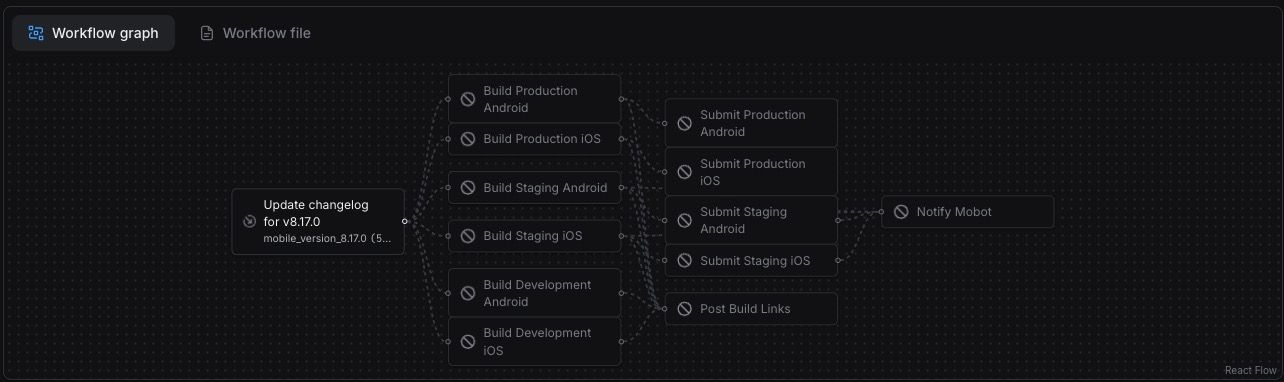
现在,PR 中应包含对 changelog 的修改,以及移动应用中 package.json 新版本号的更新。
至此,唯一需要手动完成的部分就只剩下提交应用审核并点击发布。我们认为这一步不应自动化,因为它可能涉及 bundle 更新之外的更多改动。
自动化 4:主工作流
在这个阶段,我们的主工作流应负责:
-
当 PR 被合并时,创建并 rebase 我们的 OTA 分支
-
当 PR 被合并时,创建并 rebase 我们的版本分支 / 关闭任何重叠的 OTA 分支
-
当 OTA 分支或版本分支被合并时,在 GitHub 上创建新的 release
name: Production Deploy

on:
  push:
    branches: ['main']

concurrency:
  cancel_in_progress: true
  group: ${{ workflow.filename }}-${{ github.ref }}

jobs:
  fingerprint:
    name: Fingerprint
    type: fingerprint
    environment: production

  get_android_build:
    name: Check Android build
    needs: [fingerprint]
    type: get-build
    params:
      fingerprint_hash: ${{ needs.fingerprint.outputs.android_fingerprint_hash }}
      profile: production

  get_ios_build:
    name: Check iOS build
    needs: [fingerprint]
    type: get-build
    params:
      fingerprint_hash: ${{ needs.fingerprint.outputs.ios_fingerprint_hash }}
      profile: production

  create_release:
    name: Create GitHub Release
    needs: [fingerprint]
    if: ${{ contains(github.event.head_commit.message, 'app_version_') }}
    environment: production
    steps:
      - uses: eas/checkout
      - name: Create release
        # run a scripts to create a GH release using their API

  publish_production_android:
    name: Publish Android production OTA
    needs: [get_android_build, get_ios_build]
    if: >-
      ${{ contains(github.event.head_commit.message, 'ota_update_')
          && needs.get_android_build.outputs.build_id
          && needs.get_ios_build.outputs.build_id }}
    type: update
    environment: production
    params:
      platform: android
      branch: production

  publish_production_ios:
    name: Publish iOS production OTA
    needs: [get_android_build, get_ios_build]
    if: >-
      ${{ contains(github.event.head_commit.message, 'ota_update_')
          && needs.get_android_build.outputs.build_id
          && needs.get_ios_build.outputs.build_id }}
    type: update
    environment: production
    params:
      platform: ios
      branch: production

  update_release:
    name: Update GitHub Release
    needs: [get_android_build, get_ios_build]
    if: >-
      ${{ contains(github.event.head_commit.message, 'ota_update_')
          && needs.get_android_build.outputs.build_id
          && needs.get_ios_build.outputs.build_id }}
    environment: production
    steps:
      - uses: eas/checkout
      - name: Update release with OTA changelog
        run: bash scripts/workflows/update-release.sh

  create_ota_pr:
    name: Manage OTA PR
    needs: [fingerprint, get_android_build, get_ios_build]
    if: >-
      ${{ needs.get_android_build.outputs.build_id
          && needs.get_ios_build.outputs.build_id
          && !contains(github.event.head_commit.message, 'ota_update_')
          && !contains(github.event.head_commit.message, 'app_version_') }}
    environment: production
    steps:
      - uses: eas/checkout
      - name: Create OTA branch and PR
        run: |
          # run a script to create an OTA branch and PR incremented from the last one created from the current version

  manage_version_pr:
    name: Manage Version Branch PR
    needs: [get_android_build, get_ios_build]
    if: >-
      ${{ !contains(github.event.head_commit.message, 'ota_update_')
          && !contains(github.event.head_commit.message, 'app_version_') }}
    environment: production
    steps:
      - uses: eas/checkout
      - name: Manage version branch and PR
        run: |
          # run a script to create an Version branch and PR incremented from the last one created from the current version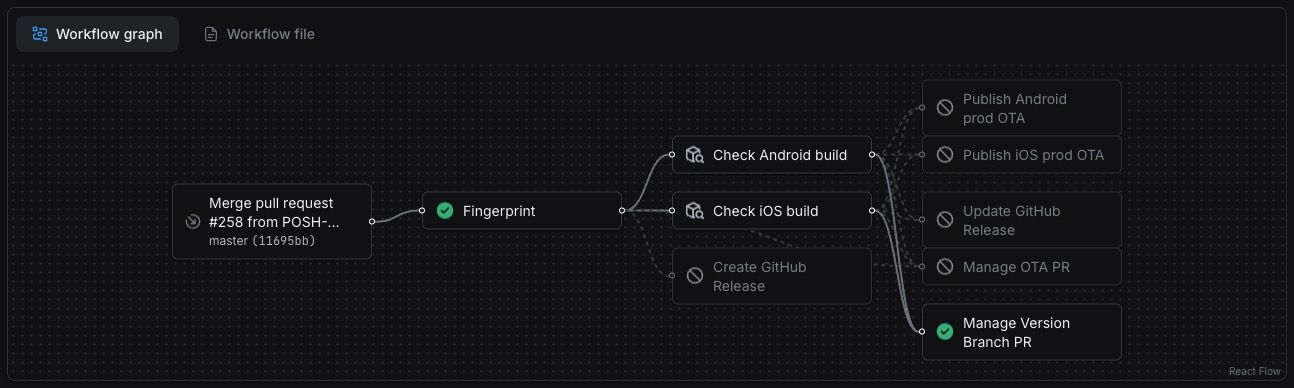
自动化 5:通知团队
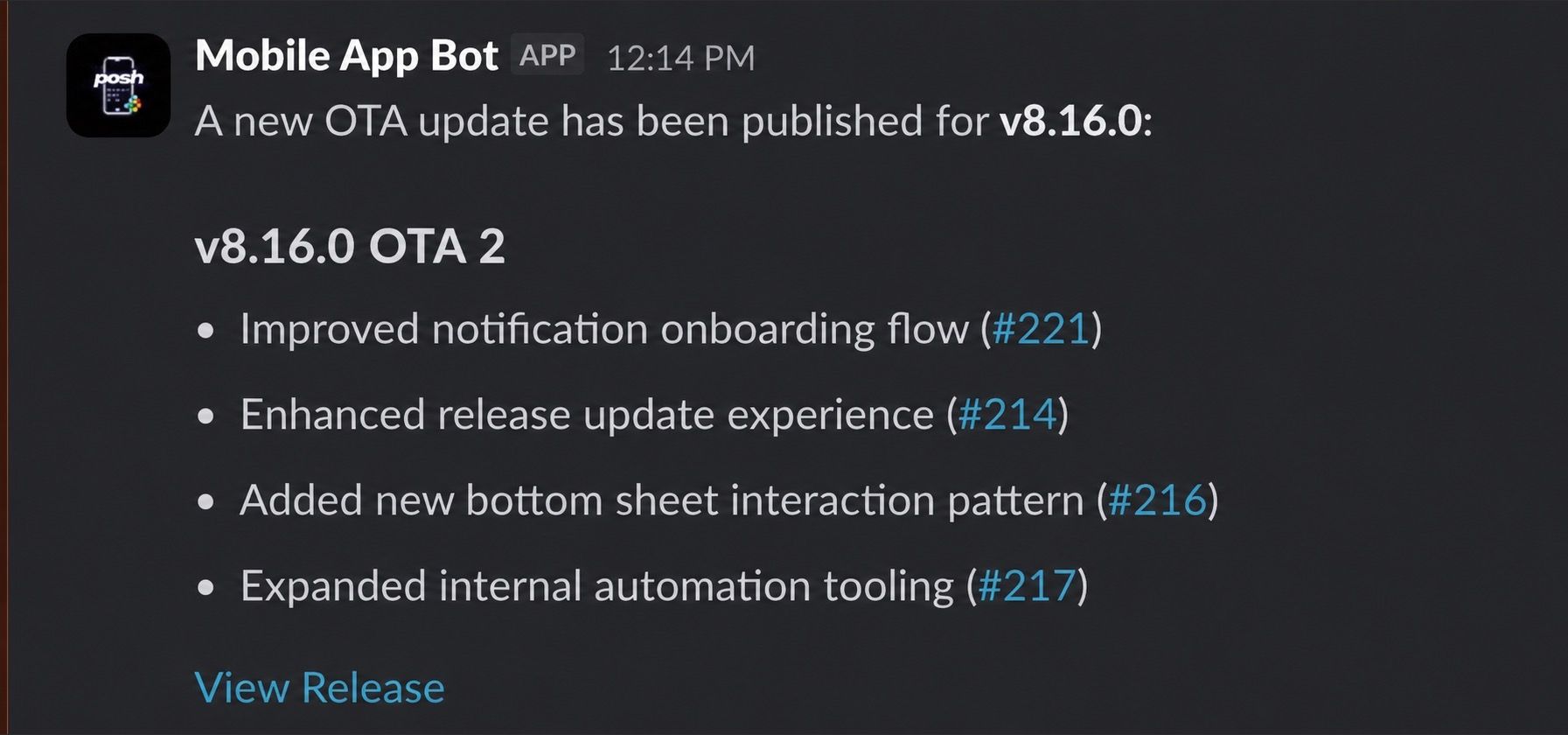
OTA 或版本分支合并后,我们会用各分支自动生成的 changelog 在仓库里创建一个 GitHub release。在此基础上,我们创建了一个在 release 发布时触发的 GitHub Action,它会:
-
在团队的 Slack 频道发一条消息,说明有新变更已部署!
-
找出与该版本合并进来的变更相关联的每一个 Linear 工单,并给它打上版本号的标签
name: Release Slack Notification

on:
  release:
    types: [published]

jobs:
  notify:
    name: Post Release to Slack
    runs-on: ubuntu-latest
    steps:
      - name: Send release to Slack
        run: |
          # Build and send a Slack message for the published release.
          # Find all the Linear issues completed in this release and add a version label to them using Linear's API
          # Include whatever your team needs, such as the release tag,
          # changelog, links to pull requests, or the release URL.
对于这批 OTA 或原生变更中改动的任务,你想做什么都可以。对我们来说,就是给 Slack 发一条消息,让团队知道变更何时开始推送,并更新 Linear 上最近发布的 issue,让它们带上新的版本标签。
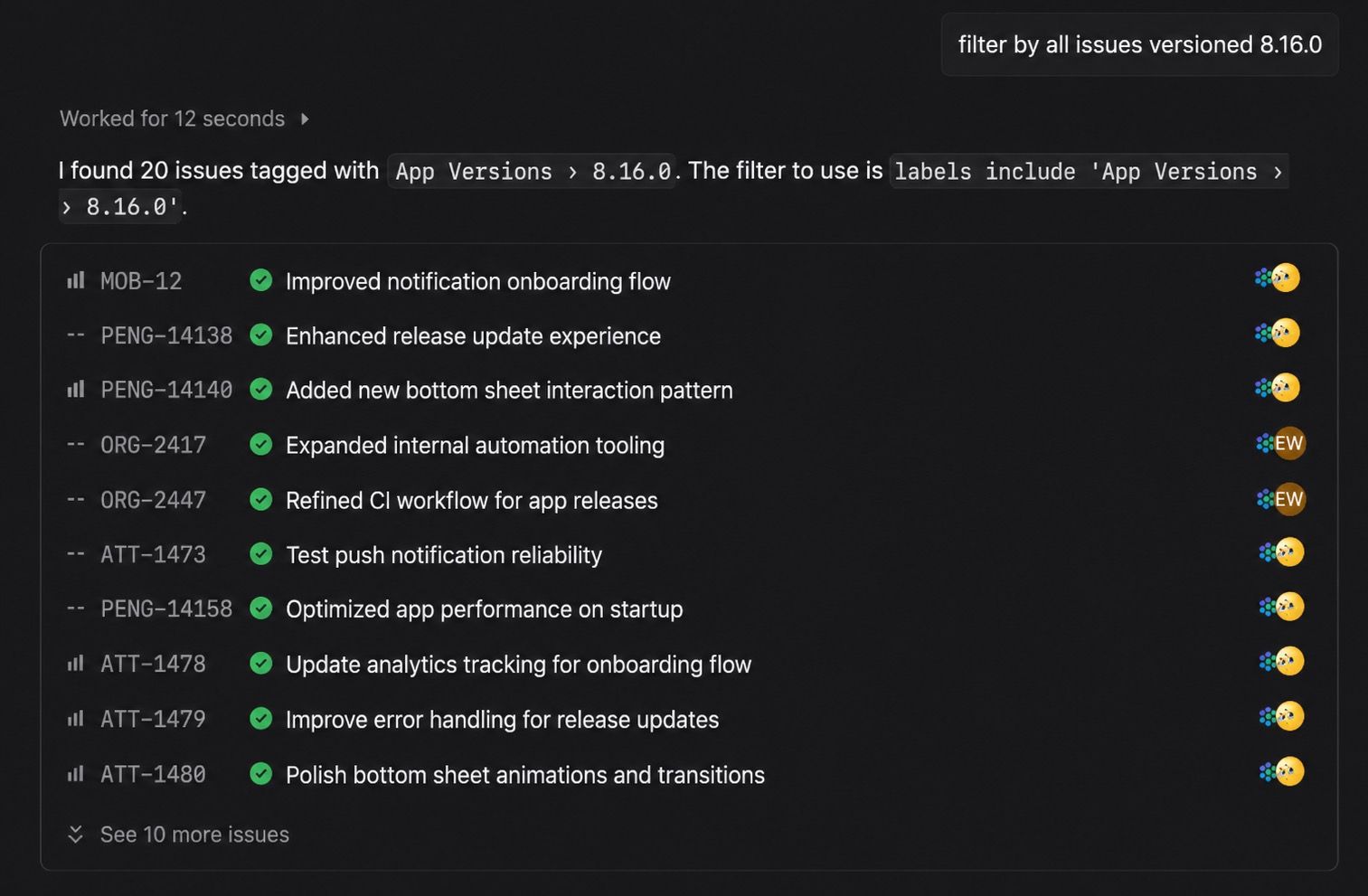
现在,我们组织里的任何人都能按已发布的版本无缝筛选 issue。这对 PM 和支持团队尤其有用。至此,我们的发布周期在 OTA 更新和原生更新两条线上都实现了闭环。再说一遍,对移动应用来说,MERGED ≠ DEPLOYED。
结语
采用这套工作流之后,OTA 分支和版本分支的创建与管理已完全自动化,既有先过 staging 环境这道安全网,又不会过度触发构建。作为移动端工程师,我们不用再操心 app 版本号怎么递增,不用再处理跨部门沟通——告诉别人新改动什么时候发到 app 上,更不用怕一不小心把错误的 OTA 推给几百万用户 😰。
先说一句:没有 Expo Workflows 和 fingerprinting,这套东西搭起来会很痛苦。
Expo 及其持续不断的开发者体验改进,是我们能拿到 App Store 娱乐类第一的关键一环。
接下来我们还会继续推进这条流水线。如果你觉得有可以迭代的地方,或者这篇指南帮到了你,欢迎随时联系我。