ロボティクス向け Gemini 4 Argon
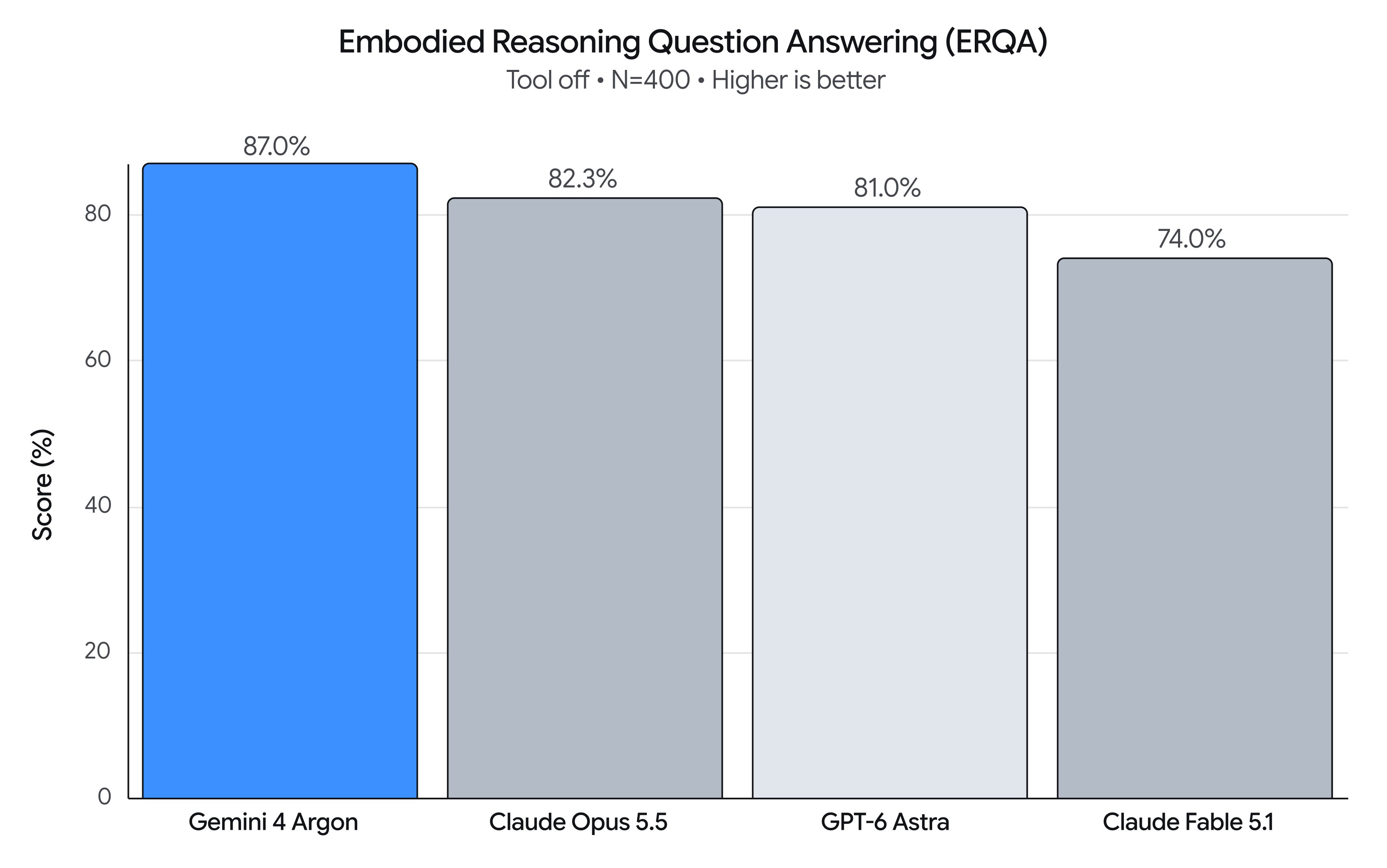
Gemini 4 Argon が身体性推論のベンチマーク ERQA で 87% を記録して首位に立った。Google は、定点での移動マニピュレーション、ゼロショット制御、ロボットや人間の動画からの Real2Sim、自己改善ループまでを実演している。
日本語
コピー
Gemini 4 Argon は、物理理解・コード生成・視覚的意味推論において飛躍的な進歩を遂げた。ロボティクスのスタックに新しいワークフローをもたらし、物理 AGI への道を加速させる。この能力の跳ね上がりは Embodied Reasoning (ERQA) ベンチマークにはっきりと表れている。3D 環境における物理的・空間的な問題をモデルがどれだけ理解し解けるかを測るテストだ。純粋な推論だけで Argon は 87% を記録し、他のあらゆるフロンティアモデルを上回った。
汎用物理推論モデルとして、Argon はロボティクスのライフサイクル全体を貫く。本記事では、4つの重要領域における Argon の代表的なプロンプトを紹介する。
- ロボット制御 → MuJoCo を用いた移動操作の練習、ゼロショットのロボット制御、動画ワールドモデルによる閉ループ誘導。
- Real2Sim → ロボットのカメラ映像、一人称の人間動画、手描きの紙のスケッチから、物理的にキャリブレーションされたシミュレーションツインを再構築する。
- 物理理解 → エージェント型マルチモーダル事後アノテーション。器用さの細かな理解、密な価値関数、進捗推定を含む。
- 研究と自己改善 → シミュレーションによる動作改善と、ハードウェア上での反復的な自己改善。
Argon でロボット制御を解き放つ
1. Spot の移動操作:MuJoCo での練習を経てゴミをゴミ箱に捨てる
Argon は Boston Dynamics Spot® 四足歩行ロボット(12自由度の脚+6自由度のアーム)を制御し、新しいスキルを習得させる。ペダル式ゴミ箱のペダルを踏み、空き缶を中に投げ入れるというものだ。Argon はペダル式ゴミ箱の関節付き MuJoCo デジタルツインを構築し、まずシミュレーションで動作を練習してから、実機のペダルを踏み、開いたゴミ箱に空き缶を落とす。
申し訳ありません。お使いのブラウザはこの動画を再生できません
Spot の移動操作——Real-to-Sim-to-Real によるペダル式ゴミ箱への廃棄:Spot は空き缶を拾い、手首カメラで確認し、MuJoCo で三脚の三角支撑バランスを練習し、ペダルを踏み、手が開いたゴミ箱の口に合っていることを確認してから、缶を中に落とす。
プロンプト:
There's a Diet Coke can behind you and another on the black table on your left.
Use the spot-mobile-manipulation skill to pick them up and trash them in the black foot-pedal bin.
Before stepping down on the pedal, verify in the front cameras that your front-right foot target is centered on the pedal, and use a 2-agent verification swarm (foot-verifier and hand-verifier) to verify both the foot-pedal step and the 3D hand-in-bin alignment before releasing.
Plain text
Copied
2. ゼロショット制御
Argon はシンプルなアームを制御し、倒れたカップを起こして、丸めたナプキンを中に入れる。Argon は視覚的な座標フレームと動作プリミティブを用いて推論し、複数のターンにわたってこのタスクを完了する。
申し訳ありません。お使いのブラウザはこの動画を再生できません
左:三人称の実機ロボット視点。右:キャリブレーション済みの手首カメラ。投影された 2 cm のワールド座標とグリッパ閉鎖のクロスヘアが重ねられている。
プロンプト:
[Attached: wrist_cam.png, obs.json]

Task: Get the robot arm to reorient the mug upright and put the napkin inside the mug.

## Execution Discipline
- Simply output 1 sentence observation followed immediately by your `curl` command (with `# Plan:` on Turn 1 and `# Thought:` on every turn). Everything needed is in `obs.json` and the calibrated reticle/grid drawn on `wrist_cam.png`.

## Visual Coordinate Reference (Annotated on wrist_cam.png)
- `+X` (UP in image): Away from robot base | `-X` (DOWN): Towards robot base
- `+Y` (LEFT in image): World left         | `-Y` (RIGHT): World right
- `+Z`: Height above table                | `Yellow numbers`: World (X, Y) in centimetres (2 cm grid at `grid_z`)
- `Cyan + crosshair`: Current 3D pinch center
- `Cyan [ + ] brackets`: Current jaw opening and closing line
- `Green line`: Current object long-axis orientation (`yaw_deg`: 0° = vertical along +X, 90° = horizontal along +Y)
- `pitch_deg = 90°`: Straight down (-Z) top-down grasp/place; `pitch_deg < 60°`: Tilted coaxial approach along finger axis

## Closed-Loop Turn Workflow
1. Inspect current state & view `wrist_cam.png`:
   `curl -s http://127.0.0.1:8081/obs` (returns `ee_pos`, `holding`, `status`, `workspace`, `wrist_cam_path`).
2. Select VLM call granularity upfront on Turn 1:
   - Coarse (2–4 calls): `look_at` -> `grasp` -> `place` -> `done`
   - Pre-Grasp Hover Verify (4–7 calls): `look_at` -> `goto(z=0.04)` (verify cyan `[ + ]` brackets straddle target) -> `grasp` -> `place_until_contact` -> `done`
   - Fine Visual Servoing (8–20 calls): `look_at` -> `grasp` -> pre-pose `goto` -> closed-loop `move_by` / `move_until_contact` -> `done`
3. Send motion primitives (`POST /plan`) and verify visually after every turn in the updated `wrist_cam.png`. If `status == "grasp_failed"`, call `robot.look_at(...)` to re-observe and recover closed-loop.

## Code-as-Policies Primitives (`POST http://127.0.0.1:8081/plan`)
robot.look_at(x=0.35, y=0.13, z=0.14, grid_z=0.015)
x, y = robot.deproject(u=0.52, v=0.48, z_plane=0.015)
robot.grasp(x=x, y=y, z=0.015, yaw_deg=-35, pitch_deg=90)
robot.place(x=0.24, y=0.06, z=0.075)
robot.place_until_contact(x=0.24, y=0.06, z=0.015, max_lag=0.012, relief=0.002)
robot.goto(x=0.28, y=0.05, z=0.04, arc_z=0.14, pitch_deg=25, azimuth_deg=90, roll_deg=0, speed=0.10)
robot.move_by(forward=0.025, dz=-0.002, dpitch_deg=-3, droll_deg=5, speed=0.04)
robot.move_until_contact(dz=-0.06, speed=0.03, max_lag=0.012, relief=0.002)
robot.open_gripper() / robot.close_gripper() / robot.home() / robot.done()
Plain text
Copied
3. Omni 制御
Argon は Gemini Omni World Model 内でロボットを操作し、散らばった5つの Scrabble タイル(G, R, A, N, O)を一列に並べ直して A - R - G - O - N を綴る。Argon は静的なプロンプトを指定するのではなく、閉ループの視覚回路の中で操作する。タイムスタンプ付きの動作プロンプトを書き、中間 rollout のキーフレームを確認し、プロンプトを修正し続ける。
申し訳ありません。お使いのブラウザはこの動画を再生できません
反復的な動画ワールドモデルによる器用な手の操作:33ステップの制御された動画 rollout で A-R-G-O-N を綴る。
プロンプト:
Goal: {task_goal}

You are steering a video world model (Gemini Omni) in an iterative visual feedback loop. Inspect the attached frames from the latest rollout and write the next timestamped action prompt for the video world model:
- Break complex motions into one simple, single-direction action at a time.
- Keep inactive hands retracted and avoid blocking the camera's view of objects in the workspace.
- Explicitly state which areas of the workspace become empty after an object moves.
- Use [MM:SS.mmm] timestamps for each action beat and wrap your output in <omni_prompt> tags.

Example format (sample timestamps only, not the full prompt):
<omni_prompt>
[00:00.000] Character A's left hand rests at the side while the right hand reaches toward the target object.
[00:02.500] Character A's right fingertips push the object smoothly into the center of the table, leaving its starting area empty.
[00:05.000] Character A's right hand opens and retracts to the side so all placed objects remain in clear view of the camera.
</omni_prompt>
Plain text
Copied
Argon で Real2Sim を貫く
1. ロボット視点からシミュレーションへ
Argon は実機ロボットのテレオペレーション映像を視聴し、デジタルツインを構築する。シミュレーションアセットを取得または作成し、その外観と、器用な手との接触時の挙動を実物体と一致させる。Argon は反復的な視覚推論回路の中でアセットとシーンを調整し、シミュレーションの映像と接触イベントを実機の記録データに合わせ込む。
申し訳ありません。お使いのブラウザはこの動画を再生できません
左(実機視点):同期された実機ロボットのカメラ映像。右(シミュレーション):Argon が再構築しキャリブレーションした 3D MuJoCo シーン。
プロンプト:
[Attached: robot_rollout_episode]

Build a MuJoCo scene of the robot and reconstructed task objects. When each episode is replayed frame by frame, by driving the robot joints toward the logged observation.state with joint-space PD.

Iterate using two verification objectives:
(1) Visual match: MuJoCo renders from the head_left, left_wrist, and right_wrist cameras line up with, and look like, those real observations.
(2) Physical match: the simulated contact force/torque on each Sharpa fingertip, in the sensor frame, matches the logged tactile_force in timing, magnitude and direction.

What you can tune happens before simulation starts:
(1) Static object assets: realistic geometry, collision shapes, mass, inertia, friction and joints, with appearance close to the real objects, plus the initial object poses at t = 0.
(2) Offline-planned robot commands, changed only in frames where the real fingertips are near an object. Each command must stay within 0.55 rad (arm joints) and 0.65 rad (hand joints) of the logged teleop trajectory. Everywhere else, replay the logged trajectory unchanged.

No sim cheating: task objects may move only through real MuJoCo contact with the robot hands and the environment (mj_step).
Not allowed after t = 0: changing MjModel parameters; applying external forces or torques to objects; welds or equality constraints; feedforward torques beyond joint-space PD; setting or rolling back object qpos/qvel; disabling or excluding collisions; reporting contact forces that don't come from the MuJoCo solver (for example, copying the logged tactile readings).

Immediately present the reconstructed scene and rollout results as an interactive HTML session viewer with one page per episode, showing:
- At the bottom: A synced timeline (play, scrub, speed control) that drives every panel.
- On the left panel: An interactive 3D Blender scene showing the simulated robot and objects, showing contact points and force arrows as replay progresses.
- On the right panel: Real vs. sim camera views side by side for all 3 cameras. Real vs. sim finger force visualizations.
Plain text
Copied
2. 人間視点からシミュレーションへ
操作タスクの一人称の人間動画が与えられると、Argon はタスクに関連する物体を識別し、粗いバウンディングボックスを複合凸分解メッシュに置き換えて凹形状の容器に対応し、人間の手の軌跡を MuJoCo の接触物理における76自由度の双腕ヒューマノイドにリターゲットする。その両手は22自由度の五指ハンドだ。
申し訳ありません。お使いのブラウザはこの動画を再生できません
人間視点からシミュレーションへ——一人称の人間動画から器用なヒューマノイドツインへ:左が入力の一人称人間 RGB 動画。右が同期された 500 Hz の MuJoCo + Blender Cycles マルチビューシミュレーション rollout。
プロンプト:
[Attached: egocentric_human_video.mp4, candidate_sim_views.png, hand_3d_keypoints.json]

You are building a physically solvable 500 Hz MuJoCo manipulation environment (`scene.xml`) and studio Blender render that faithfully reproduces the tabletop task shown in `egocentric_human_video.mp4` on a bimanual humanoid robot with 22-DoF dexterous five-fingered hands:

1. Scene Reconstruction & Camera Calibration:
   - Identify only the manipulation-relevant objects (the grasped target object and the receiving container or landmark) and triangulate their 3D tabletop coordinates from the egocentric camera intrinsics/extrinsics.
   - Replace crude bounding boxes with compound convex-decomposed 3D meshes so concave containers (nested bowls, recessed wooden trays, open bins) support physical interior placement.

2. 500 Hz Dexterous Motion-Fitting Stress Test:
   - Retarget the 3D human wrist and finger keypoints to the humanoid's 7-DoF arm and 22-DoF hand joints, and step the trajectory in MuJoCo at 500 Hz (dt = 0.002s) with zero kinematic weld constraints.
   - Verify opposing thumb-and-finger force closure, clean object lift (> 2 cm), and stable final placement inside or beside the target landmark.
Plain text
Copied
3. スケッチからシミュレーションへ
Argon があれば、開発者は手描きスケッチの写真を撮るだけでよい。描かれているのは、Apollo 2 ヒューマノイドが放物線を描いてボールを投げ、テーブル上の 3-2-1 に積まれた箱を倒す図だ。Argon は GPU 加速された mujoco_warp シーンを自動で構築し、76自由度の全身+五指によるバランスの取れた投擲軌道を合成し、閉ループ物理で 6/6 のターゲット撃破を検証し、Blender 4.5 Cycles のレンダリングをエクスポートする。
申し訳ありません。お使いのブラウザはこの動画を再生できません
Sketch to Simulation——手描きスケッチから器用なヒューマノイドの軌道とループレンダリングへ。
プロンプト:
[Attached: hand_drawn_throw_sketch.jpg]

Translate this hand-drawn sketch into a physically verified humanoid simulation in `mujoco_warp` and a raytraced Blender Cycles video:

1. Scene & Kinematic Setup from Sketch:
   - Parse the spatial layout from `hand_drawn_throw_sketch.jpg`: place the 76-DoF humanoid (32-DoF body equipped with two 22-DoF five-finger dexterous hands) at the origin facing a table holding a 3-2-1 pyramid of 6 rigid target boxes, with a projectile sphere grasped in the right five-finger hand.

2. Whole-Body Balance & Dexterous Throw Synthesis:
   - Synthesize a 50 Hz whole-body throwing trajectory (140 steps, 2.80 s) across four phases: (1) stable stance & 5-finger power grasp closure, (2) torso/shoulder wind-up with ankle-hip Center-of-Mass compensation, (3) forward whipping acceleration, and (4) synchronized 22-DoF five-finger opening at peak hand velocity so the ball launches on a ballistic arc into the pyramid's second-tier center of mass.
   - Verify in `mujoco_warp` contact physics that the humanoid maintains upright balance (< 3 cm pelvis drift) and knocks down all 6 target boxes.
プレーンテキスト
コピーしました
Argon で物理理解を解き放つ
1. 事後アノテーションとデータ品質
Argon は器用な操作を物理的に正確に理解し、動画から細かな区間分割とテキスト注釈を生成する。停止、不安定な把持、取りこぼしといった低品質な操作区間も検出できる。俯瞰映像を1本与える。双臂 ALOHA 2 ロボットが136秒で正方形の紙を折り紙の狐に折る映像だ。Argon はこれに対し、時間に整合した4段階の事後注釈階層を出力する。Episode Goal(G1)、連続する6つの Semantic Subtask(G2)、接触レベルの17の Atomic Primitive(G3)、そして自動的な品質管理(QC)の再重み付け——取りこぼしや再試行の間もタスク進捗を変えずに保つ。
申し訳ありません、お使いのブラウザはこの動画の再生に対応していません
Argon の多粒度事後注釈とテレメトリ HUD。
プロンプト:
[Attached: Aloha2_Origami_20250309.mp4]

Produce a time-aligned multi-granularity hindsight annotation JSON with four levels:
1. G1_episode_instruction: Concise imperative sentence describing the overall manipulation goal.
2. G2_subtasks: Contiguous semantic subtask phases specifying which arm(s) anchor vs. fold/rotate the object.
3. G3_atomic_primitives: Fine-grained contact-level primitives (3–15s) aligned with grasp closure, crease sweeps, release, or retry attempts.
4. quality_control_and_reweighting: Hold task_progress_pct flat during non-progressing slip/delamination retry loops and downweight them (0.15x–0.25x) for Behavior Cloning.
プレーンテキスト
コピーしました
2. 異球を見つける
古典的な12球天秤パズルをロボットで再現するため、Argon は双臂 Franka FR3 の MuJoCo 環境を構築した。中には外見がまったく同じ12個のビリヤード球(1個だけ密かに重いか軽い)と、関節付きの Roberval 型二皿天秤がある。続いて純粋に視覚だけの閉ループソルバを書いた。ステレオ RGB カメラで球を三角測量し、計量のたびに天秤の傾きを視覚で読み取り、3回の計量で異球を Heavy(赤)または Light(青)のトレイに特定する。
申し訳ありません、お使いのブラウザはこの動画の再生に対応していません
異球を見つける(純粋に視覚だけの閉ループソルバ):双臂 Franka FR3 が Gold/Teal トレイ上の候補球を計量し、ステレオ天秤の傾きを読み取り、3回の計量で確認された重い異球を赤いトレイに特定する。
プロンプト:
# Prompt 1 — Physics-Accurate MuJoCo Environment & Benchmark Generation
Make a MuJoCo environment where a dual-arm robot (two 7-DoF Franka FR3 arms with parallel-jaw grippers on a shared tabletop) is tasked to solve the classic 12-ball balance scale weight puzzle from https://www.mathsisfun.com/pool_balls_solution.html.
1. Create 12 visually indistinguishable pool balls in a 2x6 starting rack (11 standard 150 g, 1 odd ball either 270 g or 30 g).
2. Build a functional two-pan Roberval balance scale at the center of the table with parallelogram equality constraints (`mjEQ_JOINT`) so the Left (Gold) and Right (Teal) pans stay horizontal, plus Red (Heavy) and Blue (Light) submission trays.
3. Track distinct settled weighings (`weighing_count`) and reward `1.00` for isolating the true odd ball in the correct Heavy/Light tray within <= 3 weighings.

# Prompt 2 — Closed-Loop Vision-Only Solver
Implement an independent closed-loop policy relying strictly on stereo RGB camera inputs (`head_camera_left_rgb_image`, `head_camera_right_rgb_image`) and robot proprioception (`add_privileged_task_observations=False`):
1. Segment the 12 balls, Gold/Teal pans, and Red/Blue trays in both stereo views and triangulate their 3D coordinates.
2. Visually read the balance scale tilt after each weighing from stereo vertical pixel disparity (+1 = left heavier, -1 = right heavier, 0 = balanced).
3. Rotate the gripper wrist yaw by 90 degrees when grasping/placing inside the narrow scale pans to clear the raised rims, and isolate the odd ball into the Red or Blue tray within <= 3 weighings.
プレーンテキスト
コピーしました
3. 価値関数
Argon はロボットタスクに使える汎用の価値関数だ。人間の UMI データセットから取った60秒の双臂リング通しタスクで評価すると、Argon は接触の切り替わりを中心に、同期した頭部・左グリッパ・右グリッパのカメラ映像を繰り返し確認し、稠密な価値関数/タスク進捗の予測を生成し、軌跡を28区間に分解する。各区間には正・中立・負の進捗傾きが付く。
申し訳ありません、お使いのブラウザはこの動画の再生に対応していません
Value Function:3系統カメラの UMI 同期再生(頭部・左グリッパ・右グリッパ)。アニメーションするタスク進捗曲線と双臂の区間注釈に同期して固定される。
プロンプト:
[Attached: umi_head.mp4, umi_left_gripper.mp4, umi_right_gripper.mp4]

Look at 3 videos of human wearing a gripper performing activities from head, left, right gripper views. Look at the videos thoroughly and give a detailed plot of progress at the task (with positive, neutral, negative slope), identifying important segments in the video and labeling the activities. Look at individual frames or subsegments of the video if necessary to get a better understanding.
プレーンテキスト
コピーしました
Argon で研究と自己改善を解き放つ
1. シミュレーションで動作を改善する
Argon はシミュレーション内で新しいデータを生成し、汎用の視覚-言語-動作(VLA)モデルの性能を高められる。実世界の机の RGB 写真1枚から、Argon は自律的にキャリブレーション済みの MuJoCo シミュレーションツインを構築し、新しいタスクを定義し、閉ループの運動生成器を合成して、シミュレーション内で4,500件以上のドメインランダム化 episode を収集する——実世界の物理ロボットの成功率を 56% から 75% へ、完了時間を 35s から 24s へ 短縮する。
申し訳ありません、お使いのブラウザはこの動画の再生に対応していません
シミュレーションで動作を改善する:実世界の評価ベンチマークを向上(成功率 56% → 75%、完了時間 35s → 24s)。
プロンプト:
[Attached: real_tabletop_photo.jpg]

You are given a single overhead RGB camera photo (`real_tabletop_photo.jpg`) of a bimanual robot workspace (two 7-DoF Franka FR3 arms with parallel-jaw grippers and 4 RGB cameras) facing a table arranged with photobooth party props.
1. Reconstruct procedural 3D meshes and compound MuJoCo collision primitives for all 9 party props matching their real-world dimensions, colors, and resting poses, including spring-hinged deformable crown panels for the soft plush cap.
2. Define a 77-task single-arm and bimanual curriculum (pick-and-place, uprighting, directional pushing, mid-air handovers, bimanual scoop-and-push, and pipelined table clearing).
3. Synthesize a closed-loop IK trajectory generator across ±10 cm pose randomization, verify `reward == 1.0` in MuJoCo physics, and export 4,500+ episodes for VLA fine-tuning.
プレーンテキスト
コピーしました
2. 視覚的なピックアンドプレースの自己改善
シンプルな6自由度マニピュレータ上で、Argon は試行錯誤と自己反省を通じ、ピックアンドプレースタスクの実行速度と配置精度を反復的に高める。
申し訳ありません、お使いのブラウザはこの動画の再生に対応していません
SO-101 の視覚誘導ピックアンドプレース——反復 1 → 2 → 3 にわたるハードウェアの自己改善:反復 1(58.9s)、反復 2(22.9s、配置時に箱の縁をかすめる)、反復 3(17.4s、ど真ん中に落下)。
プロンプト:
# Stage 1 — Measure Objects & Dry-Run Plan (No Hardware Motion)
Stage 1: measure objects — find the objects and plan the whole motion. The arm does not move in this stage.

A. I put a LEGO brick and a box on the table in front of the arm, and the wooden box to one side. Find the brick and the wooden box in the image. And also in the real world. Show this in an annotated image.

B. A dry-run plan (no hardware). Write the planner to pick and place the lego block. Print the plan table, draw all poses onto the overhead image, and stop. Do not move the robot.
Report with evidence.

# Stage 2 — Pre-Pick Hover & Wrist-Camera Verification
Stage 2: Put the gripper above the brick without touching it, and verify with the wrist camera that the arm and the vision agree. Please record executions with both cameras (compressed video is OK).

# Stage 3 (Autonomous Pick-and-Place → Self-Improvement → Optimization):
1. Execute autonomously: Turn the Stage 1 dry run into a real grasp, lift, and place into the wooden box. Run it yourself subject to safety rules from AGENTS.md.

2. Self-improve: When an attempt fails, diagnose it yourself. Review your own logs and wrist/overhead footage, find the root cause, check the fix in a dry run, and retry.

3. Optimize on feedback: Once it succeeds, make it at least 2× faster within safety limits (rule R5) unless I authorize more, or give feedback.
プレーンテキスト
コピーしました
3. プロンプト1つでロボティクス論文を MuJoCo WebAssembly 上に再現する
論文1本につきプロンプト1つで、Argon はロボティクス制御の論文と公開済み checkpoint を読み、物理モデルと閉ループ制御器(DeepLoco の7ネットワーク階層型運動制御や HUSKY の 50 Hz PPO actor から、Whole-Body MPC の Web Worker iLQR まで)を自己完結型の MuJoCo WebAssembly ブラウザ実験環境へ移植し、ヘッドレス Chromium で検証する。
申し訳ありません、お使いのブラウザはこの動画の再生に対応していません
5本の記念碑的な脚式・ヒューマノイドロボティクス論文がブラウザ上でリアルタイムに動作する(MuJoCo WASM):ロボットサッカー OP3 1v1、DeepLoco、大規模並列深層強化学習 ANYmal C、全身 MPC Go2、そして HUSKY G1 スケートボード(Argon が再現した68個のインタラクティブなブラウザサンドボックスより)。
プロンプト:
[Attached: paper.pdf, optional author_checkpoints/ or urdf_assets/]

Reproduce the paper "<Paper Title & arXiv ID>" from scratch in MuJoCo WebAssembly and deploy a self-contained browser lab + visual essay:
1. Match the paper's exact physics timestep, actuator gains (kp/kv), torque limits, and kinematic constraints in MuJoCo XML, and run real neural inference or Web Worker iLQR in JavaScript at the paper's exact control rates.
2. Build `index.html` (Spatial UI simulator with camera presets, live telemetry plots, and disturbance injection) and `scrollytelling.html` (interactive visual essay).
3. Run a headless Chromium (Playwright) verification loop asserting 0 console errors and non-zero task progress over 300+ frames.
プレーンテキスト
コピーしました
Argon で身体性を備えた知能を前進させる
Argon はコーディング、視覚知覚、物理シミュレーション、身体を持つロボットの制御をつなぐ。多視点映像、3次元幾何、接触力学、固有感覚テレメトリをネイティブに推論することで、Argon はシーンにどの物体があるかだけでなく、それらがエージェントと物理的にどう相互作用するかまで理解し、全身を使った器用なタスクを成し遂げる。Gemini 4 Argon は重要なマイルストーンであり、物理 AGI への道を加速する。この中核知能を築くことで、私たちはロボットが人間と並んで働き、複雑な課題を解決できるようにすることを目指している。
すぐに始める
Gemini 4 Argon は、今日から Google の開発者プラットフォームで使える:
- Google AI Studio: Google AI Ultra の購読者向け。
- Gemini API: AI Studio の Gemini API 有料ティアで利用できる。Interactions API では
gemini-4-argonを使い、初日からすべてのgoogle-genaiSDK をサポートする。 - Google Antigravity: Google AI Ultra の購読者向け。使い始めるには Google Antigravity で Gemini 4 Argon(
gemini-4-argon)を現在のモデルとして選択し、複雑な計画、/goalの実行、マルチエージェントのオーケストレーションに使う。