面向机器人技术的 Gemini 4 Argon
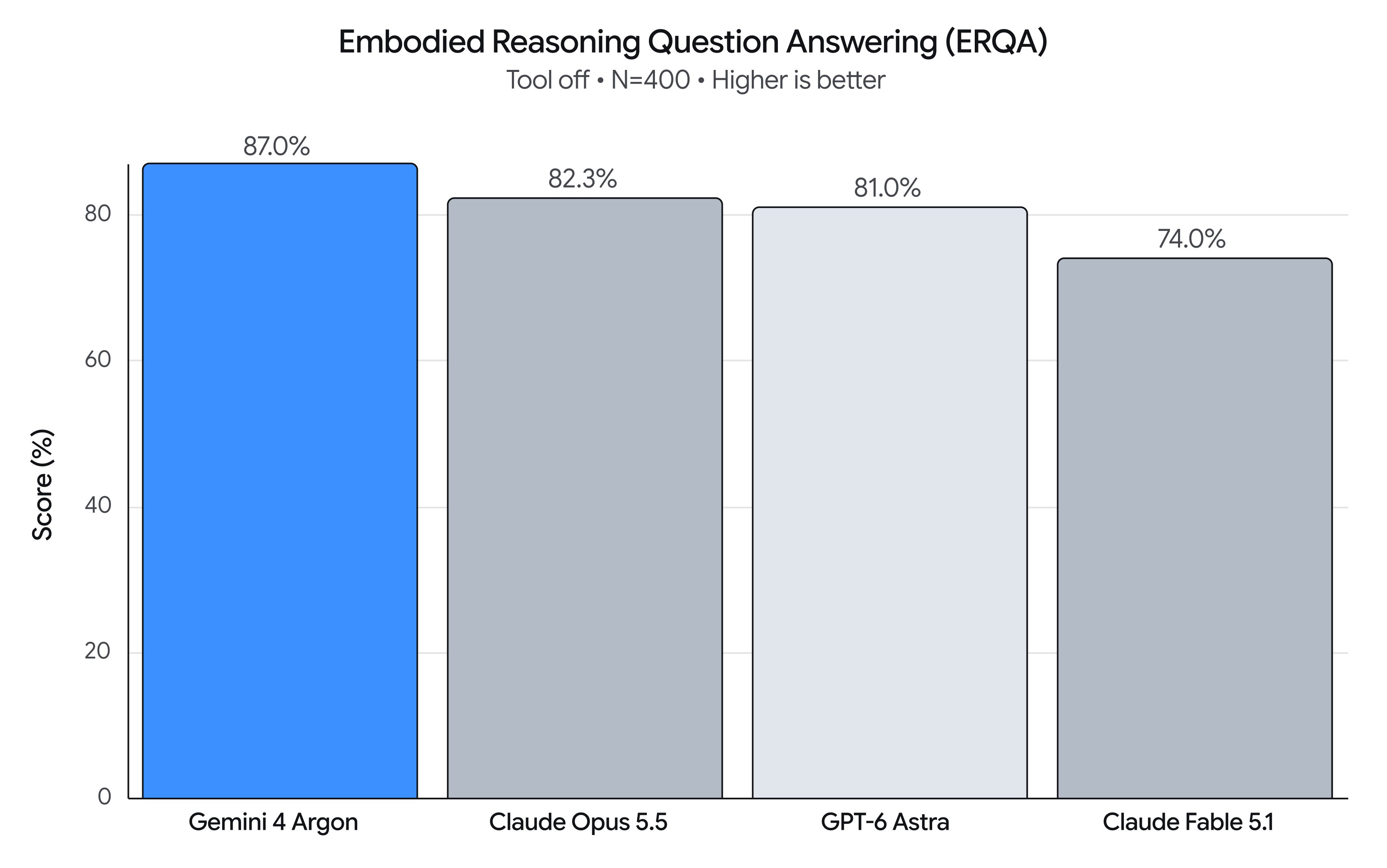
Gemini 4 Argon 以 87% 的成绩在具身推理基准 ERQA 上排到第一。Google 同时演示了它怎么驱动定点移动操作、零样本控制、从机器人或人类视频做 Real2Sim,以及自我改进循环。
中文
复制
Gemini 4 Argon 在物理理解、代码生成和视觉语义推理方面实现了跨越式进步——为机器人技术栈解锁了新的工作流,也加快了迈向物理 AGI 的进程。这一能力跃升可以在 Embodied Reasoning (ERQA) 基准测试上看到,该测试衡量模型理解和解决 3D 环境中物理与空间问题的能力。仅凭纯推理,Argon 就拿下 87% 的分数,超过所有其他前沿模型。
作为通用物理推理模型,Argon 可贯穿机器人技术的整个生命周期。本文分享 Argon 在四个关键领域的代表性提示词:
- 机器人控制 → 结合 MuJoCo 练习的移动操作、零样本机器人控制,以及视频世界模型的闭环引导。
- Real2Sim → 从机器人摄像头画面、第一人称人类视频或手绘纸质草图中重建经过物理校准的仿真孪生体。
- 物理理解 → 智能体式多模态事后标注,包括对灵巧性的细致理解、密集价值函数与进度估计。
- 研究与自我改进 → 通过仿真改进动作,并在硬件上进行迭代式自我改进。
用 Argon 解锁机器人控制
1. Spot 移动操作:借助 MuJoCo 练习把垃圾丢进桶里
Argon 控制一台 Boston Dynamics Spot® 四足机器人(12 自由度腿 + 6 自由度机械臂)学习一项新技能:踩下脚踏式垃圾桶的踏板,把易拉罐扔进去。Argon 为脚踏式垃圾桶构建了一个带关节的 MuJoCo 数字孪生体,先在仿真中练习动作,再去踩真实的踏板,把易拉罐丢进打开的桶里。
抱歉,你的浏览器不支持播放此视频
Spot 移动操作——Real-to-Sim-to-Real 脚踏式垃圾桶丢弃:Spot 捡起易拉罐,查看腕部摄像头,在 MuJoCo 中练习三腿三角支撑平衡,踩下脚踏板,确认手部对准打开的桶口,然后把罐子丢进去。
提示词:
There's a Diet Coke can behind you and another on the black table on your left.
Use the spot-mobile-manipulation skill to pick them up and trash them in the black foot-pedal bin.
Before stepping down on the pedal, verify in the front cameras that your front-right foot target is centered on the pedal, and use a 2-agent verification swarm (foot-verifier and hand-verifier) to verify both the foot-pedal step and the 3D hand-in-bin alignment before releasing.
Plain text
Copied
2. 零样本控制
Argon 控制一条简单的机械臂,把倒下的杯子扶正,并将揉皱的餐巾纸放进去。Argon 借助视觉坐标框架和动作原语进行推理,分多个回合完成这项任务。
抱歉,你的浏览器不支持播放此视频
左:第三人称真实机器人视角;右:经过校准的腕部摄像头,叠加了投影的 2 cm 世界坐标与夹爪闭合准星。
提示词:
[Attached: wrist_cam.png, obs.json]

Task: Get the robot arm to reorient the mug upright and put the napkin inside the mug.

## Execution Discipline
- Simply output 1 sentence observation followed immediately by your `curl` command (with `# Plan:` on Turn 1 and `# Thought:` on every turn). Everything needed is in `obs.json` and the calibrated reticle/grid drawn on `wrist_cam.png`.

## Visual Coordinate Reference (Annotated on wrist_cam.png)
- `+X` (UP in image): Away from robot base | `-X` (DOWN): Towards robot base
- `+Y` (LEFT in image): World left         | `-Y` (RIGHT): World right
- `+Z`: Height above table                | `Yellow numbers`: World (X, Y) in centimetres (2 cm grid at `grid_z`)
- `Cyan + crosshair`: Current 3D pinch center
- `Cyan [ + ] brackets`: Current jaw opening and closing line
- `Green line`: Current object long-axis orientation (`yaw_deg`: 0° = vertical along +X, 90° = horizontal along +Y)
- `pitch_deg = 90°`: Straight down (-Z) top-down grasp/place; `pitch_deg < 60°`: Tilted coaxial approach along finger axis

## Closed-Loop Turn Workflow
1. Inspect current state & view `wrist_cam.png`:
   `curl -s http://127.0.0.1:8081/obs` (returns `ee_pos`, `holding`, `status`, `workspace`, `wrist_cam_path`).
2. Select VLM call granularity upfront on Turn 1:
   - Coarse (2–4 calls): `look_at` -> `grasp` -> `place` -> `done`
   - Pre-Grasp Hover Verify (4–7 calls): `look_at` -> `goto(z=0.04)` (verify cyan `[ + ]` brackets straddle target) -> `grasp` -> `place_until_contact` -> `done`
   - Fine Visual Servoing (8–20 calls): `look_at` -> `grasp` -> pre-pose `goto` -> closed-loop `move_by` / `move_until_contact` -> `done`
3. Send motion primitives (`POST /plan`) and verify visually after every turn in the updated `wrist_cam.png`. If `status == "grasp_failed"`, call `robot.look_at(...)` to re-observe and recover closed-loop.

## Code-as-Policies Primitives (`POST http://127.0.0.1:8081/plan`)
robot.look_at(x=0.35, y=0.13, z=0.14, grid_z=0.015)
x, y = robot.deproject(u=0.52, v=0.48, z_plane=0.015)
robot.grasp(x=x, y=y, z=0.015, yaw_deg=-35, pitch_deg=90)
robot.place(x=0.24, y=0.06, z=0.075)
robot.place_until_contact(x=0.24, y=0.06, z=0.015, max_lag=0.012, relief=0.002)
robot.goto(x=0.28, y=0.05, z=0.04, arc_z=0.14, pitch_deg=25, azimuth_deg=90, roll_deg=0, speed=0.10)
robot.move_by(forward=0.025, dz=-0.002, dpitch_deg=-3, droll_deg=5, speed=0.04)
robot.move_until_contact(dz=-0.06, speed=0.03, max_lag=0.012, relief=0.002)
robot.open_gripper() / robot.close_gripper() / robot.home() / robot.done()
Plain text
Copied
3. Omni 控制
Argon 在 Gemini Omni World Model 中操控机器人,把五个散落的 Scrabble 拼字块(G, R, A, N, O)重新排成一行,拼出 A - R - G - O - N。Argon 并非指定一个静态提示词,而是在闭环视觉回路中操控:它写出带时间戳的动作提示词,检查中间 rollout 关键帧,并不断修正提示词。
抱歉,你的浏览器不支持此视频播放
迭代式视频世界模型操控灵巧手:33 步受控视频 rollout,拼出 A-R-G-O-N。
提示词:
Goal: {task_goal}

You are steering a video world model (Gemini Omni) in an iterative visual feedback loop. Inspect the attached frames from the latest rollout and write the next timestamped action prompt for the video world model:
- Break complex motions into one simple, single-direction action at a time.
- Keep inactive hands retracted and avoid blocking the camera's view of objects in the workspace.
- Explicitly state which areas of the workspace become empty after an object moves.
- Use [MM:SS.mmm] timestamps for each action beat and wrap your output in <omni_prompt> tags.

Example format (sample timestamps only, not the full prompt):
<omni_prompt>
[00:00.000] Character A's left hand rests at the side while the right hand reaches toward the target object.
[00:02.500] Character A's right fingertips push the object smoothly into the center of the table, leaving its starting area empty.
[00:05.000] Character A's right hand opens and retracts to the side so all placed objects remain in clear view of the camera.
</omni_prompt>
Plain text
Copied
用 Argon 打通 Real2Sim
1. 从机器人视角到仿真
Argon 观看一段真实机器人遥操作片段,构建出数字孪生;它获取或创建仿真资产,使其外观以及与灵巧手接触时的行为都与真实物体一致。Argon 在迭代式视觉推理回路中调整资产与场景,让仿真画面和接触事件与真实录制数据对齐。
抱歉,你的浏览器不支持此视频播放
左(真实视角):同步的真实机器人摄像头画面;右(仿真):由 Argon 重建并标定的 3D MuJoCo 场景。
提示词:
[Attached: robot_rollout_episode]

Build a MuJoCo scene of the robot and reconstructed task objects. When each episode is replayed frame by frame, by driving the robot joints toward the logged observation.state with joint-space PD.

Iterate using two verification objectives:
(1) Visual match: MuJoCo renders from the head_left, left_wrist, and right_wrist cameras line up with, and look like, those real observations.
(2) Physical match: the simulated contact force/torque on each Sharpa fingertip, in the sensor frame, matches the logged tactile_force in timing, magnitude and direction.

What you can tune happens before simulation starts:
(1) Static object assets: realistic geometry, collision shapes, mass, inertia, friction and joints, with appearance close to the real objects, plus the initial object poses at t = 0.
(2) Offline-planned robot commands, changed only in frames where the real fingertips are near an object. Each command must stay within 0.55 rad (arm joints) and 0.65 rad (hand joints) of the logged teleop trajectory. Everywhere else, replay the logged trajectory unchanged.

No sim cheating: task objects may move only through real MuJoCo contact with the robot hands and the environment (mj_step).
Not allowed after t = 0: changing MjModel parameters; applying external forces or torques to objects; welds or equality constraints; feedforward torques beyond joint-space PD; setting or rolling back object qpos/qvel; disabling or excluding collisions; reporting contact forces that don't come from the MuJoCo solver (for example, copying the logged tactile readings).

Immediately present the reconstructed scene and rollout results as an interactive HTML session viewer with one page per episode, showing:
- At the bottom: A synced timeline (play, scrub, speed control) that drives every panel.
- On the left panel: An interactive 3D Blender scene showing the simulated robot and objects, showing contact points and force arrows as replay progresses.
- On the right panel: Real vs. sim camera views side by side for all 3 cameras. Real vs. sim finger force visualizations.
Plain text
Copied
2. 从人类视角到仿真
给定一段操作任务的第一人称人类视频,Argon 识别出与任务相关的物体,用复合凸分解网格替换粗糙的包围盒以处理凹形容器,并将人手轨迹重定向到 MuJoCo 接触物理中的 76 自由度双臂人形机器人上,其双手为 22 自由度五指手。
抱歉,你的浏览器不支持此视频播放
从人类视角到仿真——第一人称人类视频到灵巧人形孪生:左侧为输入的第一人称人类 RGB 视频;右侧为同步的 500 Hz MuJoCo + Blender Cycles 多视角仿真 rollout。
提示词:
[Attached: egocentric_human_video.mp4, candidate_sim_views.png, hand_3d_keypoints.json]

You are building a physically solvable 500 Hz MuJoCo manipulation environment (`scene.xml`) and studio Blender render that faithfully reproduces the tabletop task shown in `egocentric_human_video.mp4` on a bimanual humanoid robot with 22-DoF dexterous five-fingered hands:

1. Scene Reconstruction & Camera Calibration:
   - Identify only the manipulation-relevant objects (the grasped target object and the receiving container or landmark) and triangulate their 3D tabletop coordinates from the egocentric camera intrinsics/extrinsics.
   - Replace crude bounding boxes with compound convex-decomposed 3D meshes so concave containers (nested bowls, recessed wooden trays, open bins) support physical interior placement.

2. 500 Hz Dexterous Motion-Fitting Stress Test:
   - Retarget the 3D human wrist and finger keypoints to the humanoid's 7-DoF arm and 22-DoF hand joints, and step the trajectory in MuJoCo at 500 Hz (dt = 0.002s) with zero kinematic weld constraints.
   - Verify opposing thumb-and-finger force closure, clean object lift (> 2 cm), and stable final placement inside or beside the target landmark.
Plain text
Copied
3. 从草图到仿真
有了 Argon,开发者可以拍下一张手绘草图的照片——画的是一个 Apollo 2 人形机器人沿抛物线弧扔球,击倒桌上 3-2-1 堆叠的箱子——Argon 会自动构建 GPU 加速的 mujoco_warp 场景,合成一条平衡的 76 自由度全身加五指的投掷轨迹,在闭环物理中验证 6/6 目标击倒,并导出 Blender 4.5 Cycles 渲染。
抱歉,你的浏览器不支持此视频的播放
Sketch to Simulation——从手绘草图到灵巧人形机器人轨迹与循环渲染。
提示词:
[Attached: hand_drawn_throw_sketch.jpg]

Translate this hand-drawn sketch into a physically verified humanoid simulation in `mujoco_warp` and a raytraced Blender Cycles video:

1. Scene & Kinematic Setup from Sketch:
   - Parse the spatial layout from `hand_drawn_throw_sketch.jpg`: place the 76-DoF humanoid (32-DoF body equipped with two 22-DoF five-finger dexterous hands) at the origin facing a table holding a 3-2-1 pyramid of 6 rigid target boxes, with a projectile sphere grasped in the right five-finger hand.

2. Whole-Body Balance & Dexterous Throw Synthesis:
   - Synthesize a 50 Hz whole-body throwing trajectory (140 steps, 2.80 s) across four phases: (1) stable stance & 5-finger power grasp closure, (2) torso/shoulder wind-up with ankle-hip Center-of-Mass compensation, (3) forward whipping acceleration, and (4) synchronized 22-DoF five-finger opening at peak hand velocity so the ball launches on a ballistic arc into the pyramid's second-tier center of mass.
   - Verify in `mujoco_warp` contact physics that the humanoid maintains upright balance (< 3 cm pelvis drift) and knocks down all 6 target boxes.
纯文本
已复制
用 Argon 解锁物理理解
1. 事后标注与数据质量
Argon 对灵巧操作有精确的物理理解,能从视频中给出细致的切分与文本标注。它还能识别出暂停、抓握不稳、失手等低质量操作片段。给定一段俯拍视频:双臂 ALOHA 2 机器人在 136 秒内把一张方形纸折成折纸狐狸,Argon 会产出一套与时间对齐的 4 级事后标注层级:Episode Goal(G1)、6 个连续的 Semantic Subtask(G2)、17 个接触级 Atomic Primitive(G3),以及自动的质量控制(QC)重加权——在失手和重试期间保持任务进度不变。
抱歉,你的浏览器不支持此视频的播放
Argon 多粒度事后标注与遥测 HUD。
提示词:
[Attached: Aloha2_Origami_20250309.mp4]

Produce a time-aligned multi-granularity hindsight annotation JSON with four levels:
1. G1_episode_instruction: Concise imperative sentence describing the overall manipulation goal.
2. G2_subtasks: Contiguous semantic subtask phases specifying which arm(s) anchor vs. fold/rotate the object.
3. G3_atomic_primitives: Fine-grained contact-level primitives (3–15s) aligned with grasp closure, crease sweeps, release, or retry attempts.
4. quality_control_and_reweighting: Hold task_progress_pct flat during non-progressing slip/delamination retry loops and downweight them (0.15x–0.25x) for Behavior Cloning.
纯文本
已复制
2. 找出异球
为了用机器人复现经典的 12 球天平谜题,Argon 搭建了一个双臂 Franka FR3 的 MuJoCo 环境,里面有 12 颗外观完全相同的台球(其中一颗暗中偏重或偏轻)和一台带关节的 Roberval 双盘天平。随后它写了一个纯视觉闭环求解器:用立体 RGB 相机对球做三角定位,每次称量后用视觉读取天平倾斜,并在 3 次称量内把异球锁定到 Heavy(红)或 Light(蓝)托盘中。
抱歉,你的浏览器不支持此视频的播放
找出异球(纯视觉闭环求解器):双臂 Franka FR3 在 Gold/Teal 托盘上称量候选球,读取立体天平倾斜,并在 3 次称量内把确认的偏重异球锁定到红色托盘中。
提示词:
# Prompt 1 — Physics-Accurate MuJoCo Environment & Benchmark Generation
Make a MuJoCo environment where a dual-arm robot (two 7-DoF Franka FR3 arms with parallel-jaw grippers on a shared tabletop) is tasked to solve the classic 12-ball balance scale weight puzzle from https://www.mathsisfun.com/pool_balls_solution.html.
1. Create 12 visually indistinguishable pool balls in a 2x6 starting rack (11 standard 150 g, 1 odd ball either 270 g or 30 g).
2. Build a functional two-pan Roberval balance scale at the center of the table with parallelogram equality constraints (`mjEQ_JOINT`) so the Left (Gold) and Right (Teal) pans stay horizontal, plus Red (Heavy) and Blue (Light) submission trays.
3. Track distinct settled weighings (`weighing_count`) and reward `1.00` for isolating the true odd ball in the correct Heavy/Light tray within <= 3 weighings.

# Prompt 2 — Closed-Loop Vision-Only Solver
Implement an independent closed-loop policy relying strictly on stereo RGB camera inputs (`head_camera_left_rgb_image`, `head_camera_right_rgb_image`) and robot proprioception (`add_privileged_task_observations=False`):
1. Segment the 12 balls, Gold/Teal pans, and Red/Blue trays in both stereo views and triangulate their 3D coordinates.
2. Visually read the balance scale tilt after each weighing from stereo vertical pixel disparity (+1 = left heavier, -1 = right heavier, 0 = balanced).
3. Rotate the gripper wrist yaw by 90 degrees when grasping/placing inside the narrow scale pans to clear the raised rims, and isolate the odd ball into the Red or Blue tray within <= 3 weighings.
纯文本
已复制
3. 价值函数
Argon 是一个适用于机器人任务的通用价值函数。在来自人类 UMI 数据集的一段 60 秒双臂套环任务上评测时,Argon 会围绕接触转换反复检查同步的头部、左夹爪和右夹爪相机画面,生成稠密的价值函数/任务进度预测,并把轨迹拆解为 28 段,每段带有正向、中性或负向的进度斜率。
抱歉,你的浏览器不支持播放此视频
Value Function:三路摄像头 UMI 同步回放(头部、左夹爪、右夹爪),与动画任务进度曲线和双臂分段标注锁定同步。
提示词:
[Attached: umi_head.mp4, umi_left_gripper.mp4, umi_right_gripper.mp4]

Look at 3 videos of human wearing a gripper performing activities from head, left, right gripper views. Look at the videos thoroughly and give a detailed plot of progress at the task (with positive, neutral, negative slope), identifying important segments in the video and labeling the activities. Look at individual frames or subsegments of the video if necessary to get a better understanding.
纯文本
已复制
用 Argon 解锁研究与自我改进
1. 通过仿真改进动作
Argon 可以在仿真中生成新数据,提升通用视觉-语言-动作(VLA)模型的表现。从真实桌面的一张 RGB 照片出发,Argon 自主构建经过标定的 MuJoCo 仿真孪生体,定义新任务,并合成闭环运动生成器,在仿真中采集 4,500+ 条域随机化 episode——将真实世界物理机器人的成功率从 56% 提升到 75%,完成时间从 35s 缩短到 24s。
抱歉,你的浏览器不支持播放此视频
通过仿真改进动作:提升真实世界评测基准(成功率 56% → 75%,完成时间 35s → 24s)。
提示词:
[Attached: real_tabletop_photo.jpg]

You are given a single overhead RGB camera photo (`real_tabletop_photo.jpg`) of a bimanual robot workspace (two 7-DoF Franka FR3 arms with parallel-jaw grippers and 4 RGB cameras) facing a table arranged with photobooth party props.
1. Reconstruct procedural 3D meshes and compound MuJoCo collision primitives for all 9 party props matching their real-world dimensions, colors, and resting poses, including spring-hinged deformable crown panels for the soft plush cap.
2. Define a 77-task single-arm and bimanual curriculum (pick-and-place, uprighting, directional pushing, mid-air handovers, bimanual scoop-and-push, and pipelined table clearing).
3. Synthesize a closed-loop IK trajectory generator across ±10 cm pose randomization, verify `reward == 1.0` in MuJoCo physics, and export 4,500+ episodes for VLA fine-tuning.
纯文本
已复制
2. 视觉抓取放置的自我改进
在一台简单的 6 自由度机械臂上,Argon 通过试错与自我反思,在抓取放置任务中迭代提升执行速度和放置精度。
抱歉,你的浏览器不支持播放此视频
SO-101 视觉引导抓取放置——跨迭代 1 → 2 → 3 的硬件自我改进:迭代 1(58.9s),迭代 2(22.9s,放置时擦到盒子边缘),迭代 3(17.4s,正中落下)。
提示词:
# Stage 1 — Measure Objects & Dry-Run Plan (No Hardware Motion)
Stage 1: measure objects — find the objects and plan the whole motion. The arm does not move in this stage.

A. I put a LEGO brick and a box on the table in front of the arm, and the wooden box to one side. Find the brick and the wooden box in the image. And also in the real world. Show this in an annotated image.

B. A dry-run plan (no hardware). Write the planner to pick and place the lego block. Print the plan table, draw all poses onto the overhead image, and stop. Do not move the robot.
Report with evidence.

# Stage 2 — Pre-Pick Hover & Wrist-Camera Verification
Stage 2: Put the gripper above the brick without touching it, and verify with the wrist camera that the arm and the vision agree. Please record executions with both cameras (compressed video is OK).

# Stage 3 (Autonomous Pick-and-Place → Self-Improvement → Optimization):
1. Execute autonomously: Turn the Stage 1 dry run into a real grasp, lift, and place into the wooden box. Run it yourself subject to safety rules from AGENTS.md.

2. Self-improve: When an attempt fails, diagnose it yourself. Review your own logs and wrist/overhead footage, find the root cause, check the fix in a dry run, and retry.

3. Optimize on feedback: Once it succeeds, make it at least 2× faster within safety limits (rule R5) unless I authorize more, or give feedback.
纯文本
已复制
3. 一条提示词在 MuJoCo WebAssembly 中复现机器人学论文
每篇论文只需一条提示词,Argon 读取机器人控制论文及已发布的 checkpoint,将物理模型和闭环控制器(从 DeepLoco 的 7 网络分层运动控制和 HUSKY 的 50 Hz PPO actor,到 Whole-Body MPC 的 Web Worker iLQR)移植为自包含的 MuJoCo WebAssembly 浏览器实验环境,并在无头 Chromium 中验证。
抱歉,你的浏览器不支持播放此视频
五篇具有里程碑意义的足式与类人机器人论文在浏览器中实时运行(MuJoCo WASM):机器人足球 OP3 1v1、DeepLoco、大规模并行深度强化学习 ANYmal C、全身 MPC Go2,以及 HUSKY G1 滑板(来自 Argon 复现的 68 个交互式浏览器沙箱)。
提示词:
[Attached: paper.pdf, optional author_checkpoints/ or urdf_assets/]

Reproduce the paper "<Paper Title & arXiv ID>" from scratch in MuJoCo WebAssembly and deploy a self-contained browser lab + visual essay:
1. Match the paper's exact physics timestep, actuator gains (kp/kv), torque limits, and kinematic constraints in MuJoCo XML, and run real neural inference or Web Worker iLQR in JavaScript at the paper's exact control rates.
2. Build `index.html` (Spatial UI simulator with camera presets, live telemetry plots, and disturbance injection) and `scrollytelling.html` (interactive visual essay).
3. Run a headless Chromium (Playwright) verification loop asserting 0 console errors and non-zero task progress over 300+ frames.
纯文本
已复制
用 Argon 推进具身智能
Argon 打通了编码、视觉感知、物理仿真与具身机器人控制。通过对多视角视频、三维几何、接触力学和本体感知遥测数据进行原生推理,Argon 不仅理解场景中有哪些物体,还理解它们如何与智能体发生物理交互,从而完成全身灵巧任务。Gemini 4 Argon 是一个重要的里程碑,加速了通往物理 AGI 的进程。通过构建这一核心智能,我们的目标是让机器人能够与人类并肩工作,解决复杂的挑战。
快速上手
今天你就可以在 Google 的开发者平台上开始使用 Gemini 4 Argon 进行构建:
- Google AI Studio: 面向 Google AI Ultra 订阅用户开放。
- Gemini API: 在 AI Studio 中通过 Gemini API 的付费层级使用。在 Interactions API 中使用
gemini-4-argon,首日即支持全部google-genaiSDK。 - Google Antigravity: 面向 Google AI Ultra 订阅用户开放。要开始构建,请在 Google Antigravity 中选择 Gemini 4 Argon(
gemini-4-argon)作为当前模型,用于复杂规划、/goal运行和多智能体编排。